GPU from Silicon to Container, Part 1: GPU Provisioning in Kubernetes
A deep dive into how Kubernetes makes GPUs accessible to containers, from bare metal to CUDA applications
Introduction
Getting a GPU from silicon to a running CUDA container is a longer trip than a single nvidia.com/gpu: 1 resource
request suggests. Behind that one line, kernel drivers, container runtimes, device plugins/DRA driver, and Kubernetes
scheduling all have to agree before a workload can touch the hardware.
This is a 3-part series tracing that full path, mirroring how GPUs actually get used in a cluster:
-
Part 1 (this post): Provisioning, from the PCIe device and kernel driver, through the NVIDIA Container Toolkit and CUDA stack, to how Kubernetes discovers, schedules, and allocates GPUs to pods.
-
Part 2: Sharing, the isolation and multiplexing options (MIG, time-slicing, MPS, HAMi, and vGPU) that let multiple workloads split a physical GPU, and what each one trades away to do it.
-
Part 3: CDI, DRA & Operations, the Container Device Interface (CDI) replacing vendor-specific runtime hooks, Dynamic Resource Allocation (DRA) as the next generation of GPU scheduling, and what it takes to run GPUs reliably at scale.
By the end of this part, you’ll be able to trace exactly what happens between a pod spec nvidia.com/gpu: 1 and
a container’s cudaMalloc() call succeeding on physical silicon.
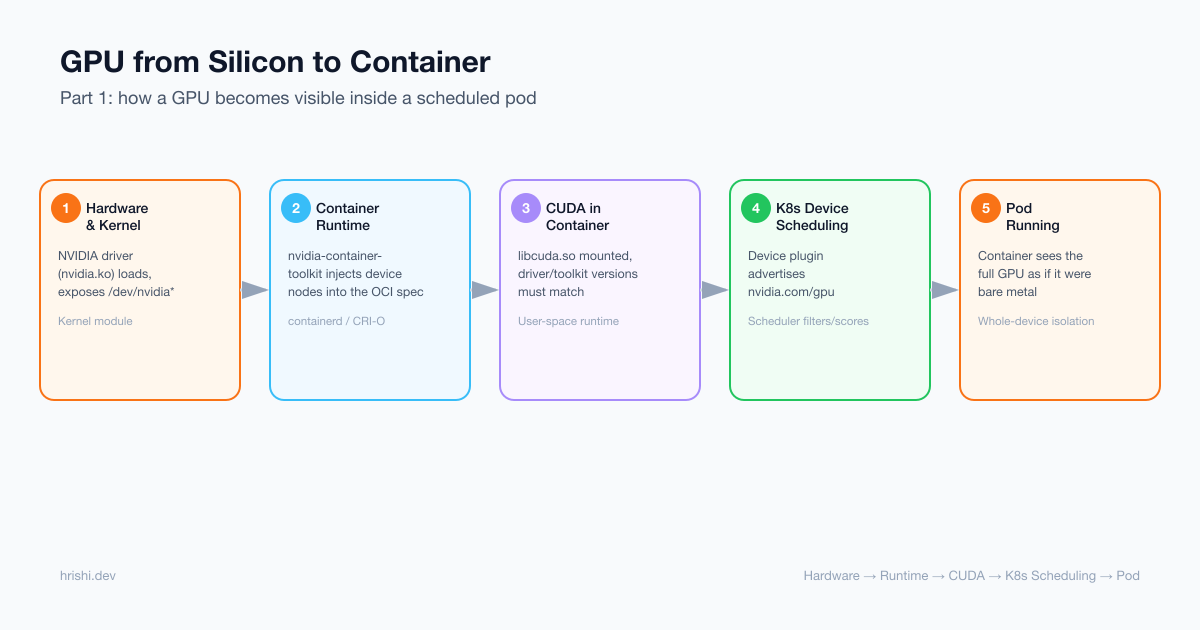
Table of Contents
Basics
Provisioning
- Hardware & Kernel Foundation
- Container Runtime GPU Access
- CUDA in Containers
- Kubernetes GPU Scheduling
- GPU Isolation & Visibility
- Complete Flow Example
GPU & CUDA Basics
Before descending into kernel modules and cgroups, it helps to know what’s actually running on the silicon.
What a GPU Is
A GPU is a massively parallel processor. Where a modern CPU has a handful of cores optimized for sequential, branch-heavy logic, a GPU packs thousands of simpler cores, organized into Streaming Multiprocessors (SMs), built to run the same instruction across many data elements at once (SIMT: Single Instruction, Multiple Threads).
Each SM has its own register file and fast on-chip shared memory; all SMs share a much larger but slower global
memory: the “GPU memory” nvidia-smi reports (e.g., 40GB on an A100).
# ./device_info
Device 0: NVIDIA H100 80GB HBM3
  Compute Capability: 9.0
  SM count: 132
  CUDA cores/SM: 128
  Total CUDA cores: 16896
  Tensor cores/SM: 4
  Total Tensor cores: 528
  Total Global Memory: 85.02 GB
What CUDA Is
CUDA (Compute Unified Device Architecture) is NVIDIA’s platform for programming that hardware: a C/C++
language extension, a compiler (nvcc), and a runtime/driver API. It lets you write a function that runs on
the GPU (a kernel) and launch it across thousands of threads with a few lines of host (CPU) code.
CUDA matters for AI/ML because training and inference are dominated by matrix multiplies and convolutions, exactly the massively parallel work GPUs are built for. Frameworks like PyTorch and TensorFlow compile down to CUDA (via libraries like cuDNN and cuBLAS) to get that speedup.
nvcc splits this file into host code (compiled with a regular C++ compiler) and device code (compiled to
PTX, then to GPU-specific machine code called SASS), bundling both into one binary.
This is the kind of program a Kubernetes pod is ultimately running. Everything from here on, driver modules,
device files, container mounts, device plugins, DRA, exists to get a call like vectorAdd<<<...>>>() a
physical GPU to execute on.
GPU Provisioning
From the PCIe device and kernel driver, through the NVIDIA Container Toolkit and CUDA stack, to how Kubernetes discovers, schedules, and allocates GPUs to pods.
Hardware & Kernel Foundation
Physical GPU Access
At the most fundamental level, a GPU is a PCIe device connected to the host system. The Linux kernel communicates with it through a sophisticated driver stack.
GPU Driver Architecture
The NVIDIA driver (similar concepts apply to AMD and Intel) consists of several kernel modules:
nvidia.ko              # Core driver module
nvidia-uvm.ko          # Unified Memory module
nvidia-modeset.ko      # Display mode setting
nvidia-drm.ko          # Direct Rendering Manager
modinfo confirms what’s actually loaded and, via its alias field, previews the major number claimed for the device files below:
# modinfo nvidia
filename:       /lib/modules/6.11.0-1016-nvidia/updates/dkms/nvidia.ko.zst
import_ns:      DMA_BUF
alias:          char-major-195-*
description:    NVIDIA core GPU kernel module
version:        580.173.02
The char-major-195-* alias is the kernel’s device-major registration: it’s why every /dev/nvidia0, /dev/nvidia1,
/dev/nvidiactl, and /dev/nvidia-modeset below shares major number 195.
Once created, the device files are:
/dev/nvidia0           # First GPU device
/dev/nvidia1           # Second GPU device
/dev/nvidiactl         # Control device for driver management
/dev/nvidia-uvm        # Unified Virtual Memory device
/dev/nvidia-uvm-tools  # UVM debugging and profiling
/dev/nvidia-modeset    # Mode setting operations
These character devices provide the fundamental interface between userspace applications and GPU hardware.
Device File Permissions
Device files have specific ownership and permissions:
# ls -l /dev/nvidia*
crw-rw-rw- 1 root root 195,   0 Oct 23 09:00 /dev/nvidia0
crw-rw-rw- 1 root root 195,   1 Oct 23 09:00 /dev/nvidia1
crw-rw-rw- 1 root root 195, 254 Oct 23 09:00 /dev/nvidia-modeset
crw-rw-rw- 1 root root 195, 255 Oct 23 09:00 /dev/nvidiactl
crw-rw-rw- 1 root root 509,   0 Oct 23 09:00 /dev/nvidia-uvm   # major varies, see note below
The major number for NVIDIA GPU devices (/dev/nvidia*, /dev/nvidiactl, /dev/nvidia-modeset) is 195, a fixed number
registered at driver load time. The UVM device (/dev/nvidia-uvm) is different: its major number is dynamically allocated
by the kernel’s misc subsystem and is not a stable value: it varies across kernel versions and distributions.
The value 509 shown above is illustrative; on kernels 6.x it is commonly 511. Minor numbers (0, 1, …) identify individual GPU instances.
On multi-GPU systems wired together with NVLink (e.g. DGX-class nodes), a driver load also creates
/dev/nvidia-nvswitchctl, the control device for the NVSwitch fabric that interconnects the GPUs. It uses its own
major number (unrelated to the 195 used for the GPUs themselves) and only shows up when NVSwitch hardware is present.
Container Runtime GPU Access
The Container Isolation Challenge
Containers use Linux namespaces to create isolated environments. By default, a container cannot access the host’s GPU devices because:
-
Device namespace isolation: Container has its own
/devfilesystem - cgroups device controller: Controls which devices a process can access
- Mount namespace: Container filesystem doesn’t include host device files
NVIDIA Container Toolkit: Bridging the Gap
The NVIDIA Container Toolkit (formerly nvidia-docker2) solves this problem by modifying the container creation process.
Component Architecture
Container Runtime (Docker/containerd)
              ↓
nvidia-container-runtime (OCI-compliant runtime wrapper)
              ↓
nvidia-container-runtime-hook (Prestart hook)
              ↓
nvidia-container-cli (Performs actual GPU provisioning)
What Gets Mounted Into the Container
When a container requests GPU access, the NVIDIA Container Toolkit mounts:
Device Files:
/dev/nvidia0              # GPU device
/dev/nvidia1              # Additional GPUs
/dev/nvidiactl            # Control device
/dev/nvidia-uvm           # Unified Memory device
/dev/nvidia-uvm-tools     # UVM tools
/dev/nvidia-modeset       # Mode setting
Driver Libraries (from host):
/usr/lib/x86_64-linux-gnu/libnvidia-ml.so.535.104.05
/usr/lib/x86_64-linux-gnu/libcuda.so.535.104.05
/usr/lib/x86_64-linux-gnu/libnvidia-ptxjitcompiler.so.535.104.05
# ... and few more
Utilities:
/usr/bin/nvidia-smi
/usr/bin/nvidia-debugdump
/usr/bin/nvidia-persistenced
cgroups Device Permissions
The toolkit also configures the cgroups device controller to allow device access:
# In the container's cgroup
devices.allow: c 195:* rwm    # Allow all NVIDIA devices (major 195)
devices.allow: c 195:255 rwm  # Allow nvidiactl
devices.allow: c <uvm-major>:* rwm  # Allow nvidia-uvm (major dynamically assigned by kernel)
The format c 195:* rwm means:
-
c: Character device -
195: Major number (NVIDIA devices) -
*: All minor numbers (all GPUs) -
rwm: Read, write, and mknod permissions
CUDA in Containers
Understanding the CUDA Stack
CUDA applications communicate with GPUs through a layered software stack:
Your CUDA Application (compiled with nvcc)
              ↓
CUDA Runtime API (libcudart.so)
  - cudaMalloc()
  - cudaMemcpy()
  - kernel<<<...>>>()
              ↓
CUDA Driver API (libcuda.so)
  - cuMemAlloc()
  - cuLaunchKernel()
              ↓
Kernel Driver (nvidia.ko)
              ↓
Physical GPU Hardware
CUDA in a Containerized Environment
When a user runs a CUDA application inside a container, the call stack looks like:
[Container] CUDA Application
              ↓
[Container] libcudart.so (CUDA Runtime)
              ↓
[Mounted from Host] libcuda.so (CUDA Driver Library)
              ↓
[ioctl() system calls]
              ↓
[Mounted Device] /dev/nvidia0
              ↓
[Host Kernel] nvidia.ko driver
              ↓
[Physical Hardware] GPU
The Critical Driver Compatibility Requirement
Key Point: The libcuda.so driver library version must match the host kernel driver version. That’s why it’s preferred
to mount the driver library from the host rather than packaging it in the container image.
Example compatibility matrix:
Host Driver Version    Compatible CUDA Toolkit Versions
-------------------    --------------------------------
535.104.05            CUDA 11.0 - 12.2
525.85.12             CUDA 11.0 - 12.1
515.65.01             CUDA 11.0 - 11.8
The CUDA toolkit in the container must be compatible with the host’s driver version, but it doesn’t need to match exactly: newer drivers support older CUDA toolkits.
In practice, images pin toolkit packages to a specific CUDA minor version rather than to the host driver. vLLM’s
Dockerfile, for instance, installs cuda-nvcc-${CUDA_VERSION_DASH}, cuda-cudart-${CUDA_VERSION_DASH}, cuda-nvrtc-${CUDA_VERSION_DASH},
and related -dev packages for runtime JIT compilation (FlashInfer, DeepGEMM, EP kernels), then separately resolves a
matching NCCL version with apt-cache madison libnccl-dev | grep "+cuda${CUDA_VERSION_SHORT}", because NCCL packages
don’t follow the cuda-MAJOR-MINOR naming convention the rest of the toolkit uses, so version pinning has to be done
by hand. The host driver only needs to be new enough to satisfy whatever $CUDA_VERSION got baked into the image this way
(see vLLM’s Dockerfile, lines 586–607).
A Simple CUDA Example
Here’s what happens when you run a basic CUDA program:
#include <stdio.h>
#include <cuda_runtime.h>

int main() {
    float *d_data;
    size_t size = 1024 * sizeof(float);

    // This triggers the entire stack
    cudaError_t err = cudaMalloc(&d_data, size);

    if (err == cudaSuccess) {
        printf("Successfully allocated %zu bytes on GPU\n", size);
        cudaFree(d_data);
    }

    return 0;
}
Behind the scenes:
-
cudaMalloc()callscuMemAlloc()inlibcuda.so -
libcuda.soopens/dev/nvidia0 - Issues
ioctl()system call withNVIDIA_IOCTL_ALLOC_MEM - Kernel driver
nvidia.koreceives the request - Driver checks cgroups: “Is this process allowed to access device 195:0?”
- If allowed, driver allocates GPU memory
- Returns device memory pointer to application
Kubernetes GPU Scheduling
Kubernetes exposes GPUs to pods in two ways: the Device Plugin framework, stable since 1.10 and still the recommended default for most clusters as of writing, and the newer Dynamic Resource Allocation (DRA), better suited to multi-node GPU topologies and richer sharing. This layer walks the Device Plugin flow end to end; DRA gets its own deep dive in Part 3.
The Device Plugin Framework
Kubernetes uses an extensible Device Plugin system to manage specialized hardware like GPUs, FPGAs, and InfiniBand adapters.
Architecture Overview
These are two separate flows, driven by different triggers, worth keeping distinct rather than reading as one straight-line pipeline. Discovery/registration runs at plugin startup (and periodically after); allocation only runs once the scheduler has already bound a pod to the node.
1. Discovery & Registration: runs at Device Plugin startup, independent of any pod:
NVIDIA Device Plugin (DaemonSet)
  - Discovers GPUs (nvidia-smi)
  - Registers with kubelet
              ↓
kubelet (on GPU node)
  - Discovers device plugins
  - Tracks GPU allocation
              ↓
kube-apiserver (Node status: nvidia.com/gpu: 4)
              ↓
kube-scheduler (Finds nodes with requested GPUs)
2. Allocation: runs per pod, only after the scheduler has bound it to this node:
kube-scheduler
  Binds pod to node with enough GPUs
              ↓
kubelet (on GPU node)
  - Calls Allocate() for the pod
              ↓
NVIDIA Device Plugin (DaemonSet)
  - Allocates specific GPUs
  - Returns envs/mounts/device specs
    (pre-CDI) or a CDI device name
    (CDI mode, v0.14+)
What the plugin returns from Allocate() depends on its mode. Older versions (and newer ones running with CDI
disabled) work out the envs, mounts, and device nodes on the fly for every call, shown as the “Pre-CDI Device
Plugin” code in CDI in Kubernetes in Part 3. NVIDIA Device Plugin v0.14+ with CDI enabled skips that
per-call computation entirely: Allocate() just returns a CDI device name (e.g. nvidia.com/gpu=0), and
containerd resolves the actual devices/mounts/env from the static spec already generated on disk; nothing is
discovered or assembled “on the go” at allocation time anymore.
Device Plugin Discovery and Registration
The NVIDIA Device Plugin runs as a DaemonSet on every GPU node:
apiVersion: apps/v1
kind: DaemonSet
metadata:
  name: nvidia-device-plugin-daemonset
  namespace: kube-system
spec:
  selector:
    matchLabels:
      name: nvidia-device-plugin-ds
  template:
    spec:
      containers:
      - name: nvidia-device-plugin
        image: nvcr.io/nvidia/k8s-device-plugin:v0.14.1
        volumeMounts:
        - name: device-plugin
          mountPath: /var/lib/kubelet/device-plugins
The Registration Process
The Register() and ListAndWatch() calls below come from the kubelet device plugin’s
gRPC API definition, which every device plugin (not just NVIDIA’s) implements.
-
Device Plugin Starts
nvidia-device-plugin container starts ↓ Queries GPUs: nvidia-smi --query-gpu=uuid --format=csv ↓ Discovers: GPU-a4f8c2d1, GPU-b3e9d4f2, GPU-c8f1a5b3, GPU-d2c7e9a4 -
Registration with kubelet
Device plugin connects to: unix:///var/lib/kubelet/device-plugins/kubelet.sock ↓ Sends Register() gRPC call: { "version": "v1beta1", "endpoint": "nvidia.sock", "resourceName": "nvidia.com/gpu" } -
Advertising Resources
kubelet calls ListAndWatch() on device plugin
           ↓
Device plugin responds:
{
  "devices": [
    {"id": "GPU-a4f8c2d1", "health": "Healthy"},
    {"id": "GPU-b3e9d4f2", "health": "Healthy"},
    {"id": "GPU-c8f1a5b3", "health": "Healthy"},
    {"id": "GPU-d2c7e9a4", "health": "Healthy"}
  ]
}
           ↓
kubelet updates node status:
status.capacity.nvidia.com/gpu: "4"
status.allocatable.nvidia.com/gpu: "4"
Pod Scheduling Flow
Let’s trace a complete pod scheduling workflow:
Step 1: User Creates Pod
apiVersion: v1
kind: Pod
metadata:
  name: gpu-pod
spec:
  runtimeClassName: nvidia   # see "Wiring the Hook" below for where this comes from
  containers:
  - name: cuda-container
    image: nvidia/cuda:11.8.0-base-ubuntu22.04
    command: ["nvidia-smi"]
    resources:
      limits:
        nvidia.com/gpu: 2  # Request 2 GPUs
Step 2: Scheduler Filters and Scores
kube-scheduler receives unscheduled pod
         ↓
Filtering Phase:
  - node-1: cpu OK, memory OK, nvidia.com/gpu=0 ✗ (no GPUs)
  - node-2: cpu OK, memory OK, nvidia.com/gpu=2 ✓
  - node-3: cpu OK, memory OK, nvidia.com/gpu=4 ✓
  - node-4: cpu ✗ (insufficient CPU)
         ↓
Scoring Phase:
  - node-2: score 85 (2 GPUs available, high utilization)
  - node-3: score 92 (4 GPUs available, moderate utilization)
         ↓
Selected: node-3
         ↓
Binding: pod assigned to node-3
Step 3: kubelet Allocates GPUs
kubelet on node-3 receives pod assignment
         ↓
For container "cuda-container" requesting 2 GPUs:
         ↓
kubelet calls: DevicePlugin.Allocate(deviceIds=["GPU-a4f8c2d1", "GPU-b3e9d4f2"])
         ↓
Device plugin responds:
{
  "containerResponses": [{
    "envs": {
      "NVIDIA_VISIBLE_DEVICES": "GPU-a4f8c2d1,GPU-b3e9d4f2"
    },
    "mounts": [{
      "hostPath": "/usr/lib/x86_64-linux-gnu/libcuda.so.535.104.05",
      "containerPath": "/usr/lib/x86_64-linux-gnu/libcuda.so.1",
      "readOnly": true
    }],
    "devices": [{
      "hostPath": "/dev/nvidia0",
      "containerPath": "/dev/nvidia0",
      "permissions": "rwm"
    }, {
      "hostPath": "/dev/nvidia1",
      "containerPath": "/dev/nvidia1",
      "permissions": "rwm"
    }]
  }]
}
If the device plugin is CDI-enabled (NVIDIA device plugin ≥ v0.14 with --device-list-strategy=cdi-annotations or cdi-cri),
the Allocate() response looks different: instead of enumerating raw devices/mounts/envs, it returns a cdiDevices
list of fully-qualified CDI device names, and lets containerd resolve each name against the CDI spec on disk:
{
  "containerResponses": [{
    "envs": {},
    "cdiDevices": [
      { "name": "nvidia.com/gpu=GPU-a4f8c2d1" },
      { "name": "nvidia.com/gpu=GPU-b3e9d4f2" }
    ]
  }]
}
The device plugin no longer needs to know host paths, library versions, or major/minor numbers at Allocate() time; it
just points at a name defined by the Container Device Interface (CDI) spec
and defers all of that resolution to whatever generated /etc/cdi/nvidia.yaml
(nvidia-ctk cdi generate, run once per driver update).
Step 4: Container Runtime Provisions GPU
kubelet → containerd: CreateContainer with:
  - Environment: NVIDIA_VISIBLE_DEVICES=GPU-a4f8c2d1,GPU-b3e9d4f2
  - Mounts: driver libraries
  - Devices: /dev/nvidia0, /dev/nvidia1
         ↓
containerd calls: nvidia-container-runtime-hook (prestart)
         ↓
Hook configures:
  - Mounts all required device files
  - Mounts NVIDIA libraries
  - Sets up cgroups device controller
  - Configures environment variables
         ↓
Container starts with GPU access
         ↓
nvidia-smi inside container shows 2 GPUs
CDI variant of Step 4: containerd receives the CDI device names (either via CRI’s CDIDevices field, or via the
cdi.k8s.io/devices pod annotation on older kubelet versions) instead of a devices/mounts list. There’s no
nvidia-container-runtime-hook prestart step: containerd’s built-in CDI support looks up each name in the on-disk CDI
spec directly and applies its containerEdits (device nodes, mounts, env, hooks) to the OCI spec before runc ever
runs. See “Post-CDI Device Plugin” in Part 3 for the full Allocate() implementation
and containerd integration flow.
Wiring the Hook: containerd Runtime Configuration
The chain above doesn’t run for every container by default: containerd has to be told that a runtime called
nvidia exists and which binary implements it, and a pod has to explicitly ask for that runtime by name. The
NVIDIA GPU Operator’s toolkit component writes this as a drop-in config on every GPU node:
version = 3

[plugins]

  [plugins."io.containerd.cri.v1.runtime"]
    ...

  [plugins."io.containerd.cri.v1.runtime".containerd]
      default_runtime_name = "runc"
      ignore_blockio_not_enabled_errors = false
      ignore_rdt_not_enabled_errors = false

      [plugins."io.containerd.cri.v1.runtime".containerd.runtimes]

        [plugins."io.containerd.cri.v1.runtime".containerd.runtimes.nvidia]
          ...
          [plugins."io.containerd.cri.v1.runtime".containerd.runtimes.nvidia.options]
            BinaryName = "/usr/local/nvidia/toolkit/nvidia-container-runtime"
            ...
Two things worth noticing:
-
default_runtime_name = "runc": plainrunchandles every container unless a pod opts out of it. The hook-based flow above is additive, not a replacement for the default path. -
Two separate
nvidiaruntimes are registered, pointing at two different binaries:nvidiaruns the classicnvidia-container-runtime→nvidia-container-runtime-hook→nvidia-container-clichain from the diagram above;nvidia-cdiskips the hook entirely and resolves devices from a CDI spec instead (the mechanism CDI and DRA build on; see Part 3).
Registering the runtime in containerd only makes it available: a pod still has to ask for it. Kubernetes exposes
that as a RuntimeClass object, which the GPU Operator also creates, mapping the cluster-facing name to the
containerd runtime handler configured above:
apiVersion: node.k8s.io/v1
kind: RuntimeClass
metadata:
  name: nvidia
handler: nvidia   # must match a [...containerd.runtimes.<handler>] block in the containerd config
A pod then opts into the hook-based path by name, via runtimeClassName:
apiVersion: apps/v1
kind: Deployment
metadata:
  name: pytorch-training
  labels:
    app: pytorch-training
spec:
  selector:
    matchLabels:
      app: pytorch-training
  template:
    metadata:
      labels:
        app: pytorch-training
    spec:
      runtimeClassName: nvidia
      containers:
      - name: pytorch
        image: intel/deep-learning:pytorch-gpu-2025.2.0-py3.11
        args:
          - python
          - train.py
          - --model=resnet18
        resources:
          limits:
            nvidia.com/gpu: 1
Without runtimeClassName: nvidia, this pod would run under plain runc and get no GPU access at all from
containerd’s side: everything from the mounted devices to libcuda.so shown below depends on the hook actually
running, which only happens when the pod names the runtime that triggers it.
GPU Isolation & Visibility
The Magic of NVIDIA_VISIBLE_DEVICES
The NVIDIA_VISIBLE_DEVICES environment variable is the key to GPU isolation in containers. It controls which GPUs are visible to CUDA applications.
How It Works
Consider a host with 4 GPUs:
# On the host
$ nvidia-smi --query-gpu=index,uuid --format=csv
index, uuid
0, GPU-a4f8c2d1-e5f6-7a8b-9c0d-1e2f3a4b5c6d
1, GPU-b3e9d4f2-f6a7-8b9c-0d1e-2f3a4b5c6d7e
2, GPU-c8f1a5b3-a7b8-9c0d-1e2f-3a4b5c6d7e8f
3, GPU-d2c7e9a4-b8c9-0d1e-2f3a-4b5c6d7e8f9a
Container 1 configuration:
NVIDIA_VISIBLE_DEVICES=GPU-a4f8c2d1-e5f6-7a8b-9c0d-1e2f3a4b5c6d

# Inside container 1
# nvidia-smi
+-----------------------------------------------------------------------------------------+
| NVIDIA-SMI 580.173.02             Driver Version: 580.173.02     CUDA Version: 13.0     |
+-----------------------------------------+------------------------+----------------------+
| GPU  Name                 Persistence-M | Bus-Id          Disp.A | Volatile Uncorr. ECC |
| Fan  Temp   Perf          Pwr:Usage/Cap |           Memory-Usage | GPU-Util  Compute M. |
|                                         |                        |               MIG M. |
|=========================================+========================+======================|
|   0  NVIDIA H100 80GB HBM3          Off |   00000000:8D:00.0 Off |                   On |
| N/A   31C    P0             69W /  700W |       0MiB /  81559MiB |     N/A      Default |
|                                         |                        |              Enabled |
+-----------------------------------------+------------------------+----------------------+
Notice that:
- Container 1 sees only 1 GPU, renumbered as GPU 0, even though the host has 4
- Setting
NVIDIA_VISIBLE_DEVICESto a different UUID (or comma-separated list) gives another container a different subset: each container gets its own isolated, independently-numbered GPU namespace
Driver-Level Enforcement
When a CUDA application initializes:
cudaError_t err = cudaSetDevice(0);
The CUDA driver:
- Reads
NVIDIA_VISIBLE_DEVICESenvironment variable - Creates a virtual-to-physical GPU mapping
- Only allows access to visible devices
cuInit() {
    visible_devices = getenv("NVIDIA_VISIBLE_DEVICES");

    if (visible_devices) {
        parse_and_filter_devices(visible_devices);
        // User's "GPU 0" maps to physical GPU as specified
    }
}
cgroups: Kernel-Level Protection
Environment variables provide application-level isolation, but cgroups enforce it at the kernel level.
For each container, cgroups device controller is configured:
Container 1:
# /sys/fs/cgroup/devices/kubepods/pod<uid>/<container-id>/devices.list
c 195:0 rwm      # Allow /dev/nvidia0 only
c 195:255 rwm    # Allow /dev/nvidiactl
c <uvm-major>:0 rwm  # Allow /dev/nvidia-uvm (major dynamically assigned by kernel)

# Implicit deny for:
# c 195:1 (would be /dev/nvidia1)
# c 195:2 (would be /dev/nvidia2)
# c 195:3 (would be /dev/nvidia3)
Even if a malicious process inside Container 1 tries to open /dev/nvidia1, the kernel blocks it:
// Malicious code attempt
int fd = open("/dev/nvidia1", O_RDWR);
// Returns: -1 (EPERM - Operation not permitted)
// Kernel: cgroups device controller denied access
This provides defense-in-depth: both application-level (CUDA driver) and kernel-level (cgroups) isolation.
Complete Flow Example
Let’s trace a complete end-to-end flow from pod creation to CUDA memory allocation.
The Scenario
We’ll deploy a pod requesting 2 GPUs and run a simple CUDA program that allocates GPU memory.
Step 1: Deploy the Pod
apiVersion: v1
kind: Pod
metadata:
  name: cuda-mem-test
spec:
  restartPolicy: Never
  containers:
  - name: cuda-app
    image: nvidia/cuda:11.8.0-devel-ubuntu22.04
    command: ["./cuda_malloc_test"]
    resources:
      limits:
        nvidia.com/gpu: 2
$ kubectl apply -f cuda-pod.yaml
pod/cuda-mem-test created
Scheduling and allocation from here follow the same flow already walked through in
Pod Scheduling Flow: the scheduler filters and scores nodes on nvidia.com/gpu availability
(say it lands on node-gpu-03), kubelet calls the device plugin’s Allocate() for GPU UUIDs GPU-uuid-1234 and
GPU-uuid-5678, and containerd folds the resulting devices, mounts, and env (or, on a CDI-enabled setup, a
cdiDevices list) into the OCI spec before runc starts the container. What’s different this time is what happens
inside the container once it’s running: that’s the part worth tracing in detail.
Step 2: CUDA Application Runs
Inside the container, our CUDA application executes:
#include <stdio.h>
#include <cuda_runtime.h>

int main() {
    int deviceCount;
    cudaGetDeviceCount(&deviceCount);
    printf("Visible GPUs: %d\n", deviceCount);

    for (int i = 0; i < deviceCount; i++) {
        cudaSetDevice(i);

        float *d_data;
        size_t size = 1024 * 1024 * 1024;  // 1 GB

        cudaError_t err = cudaMalloc(&d_data, size);
        if (err == cudaSuccess) {
            printf("GPU %d: Allocated 1 GB\n", i);
            cudaFree(d_data);
        }
    }

    return 0;
}
The execution flow:
Application calls: cudaGetDeviceCount(&deviceCount)
              ↓
CUDA Runtime (libcudart.so): cuDeviceGetCount()
              ↓
CUDA Driver (libcuda.so):
  - Reads NVIDIA_VISIBLE_DEVICES from environment
  - Parses: 'GPU-uuid-1234,GPU-uuid-5678'
  - Returns: deviceCount = 2
              ↓
Application prints: 'Visible GPUs: 2'
              ↓
Application calls: cudaMalloc(&d_data, 1GB) for GPU 0
              ↓
CUDA Runtime: cuMemAlloc(1073741824) // 1 GB in bytes
              ↓
CUDA Driver:
  - Determines physical GPU from NVIDIA_VISIBLE_DEVICES mapping
  - Virtual GPU 0 → Physical GPU-uuid-1234 → /dev/nvidia0
  - Opens file descriptor: fd = open('/dev/nvidia0', O_RDWR)
              ↓
Kernel checks cgroups:
  - Process in cgroup: /kubepods/pod-xyz/container-abc
  - Requested device: major=195, minor=0
  - cgroups device allowlist: c 195:0 rwm ✓ ALLOWED
              ↓
Kernel forwards to nvidia.ko driver
              ↓
nvidia.ko driver:
  - Allocates 1 GB of GPU memory on physical GPU
  - Programs GPU memory controller
  - Returns device memory address: 0x7f8c40000000
              ↓
CUDA Driver returns to application
              ↓
Application prints: 'GPU 0: Allocated 1 GB'
              ↓
Repeat for GPU 1 with /dev/nvidia1
              ↓
Application prints: 'GPU 1: Allocated 1 GB'
System calls involved:
# Traced with strace
openat(AT_FDCWD, "/dev/nvidia0", O_RDWR) = 3
ioctl(3, NVIDIA_IOC_QUERY_DEVICE_CLASS, ...) = 0
ioctl(3, NVIDIA_IOC_CARD_INFO, ...) = 0
ioctl(3, NVIDIA_IOC_ALLOC_MEM, {size=1073741824, ...}) = 0
# ... GPU memory now allocated ...
ioctl(3, NVIDIA_IOC_FREE_MEM, ...) = 0
close(3) = 0
Up Next
This part covered how a GPU goes from silicon to a scheduled, running container via the classic device-plugin path, with each pod getting exclusive use of a whole GPU. That’s wasteful for most workloads. Part 2: GPU Sharing Strategies picks up from here: time-slicing, MPS, MIG, HAMi, and vGPU, and what each one trades away to split a physical GPU across multiple workloads.
Key Takeaways
- A GPU shows up to the kernel as a set of character devices (
/dev/nvidia0,/dev/nvidiactl,/dev/nvidia-uvm, …) registered under a fixed major number (195 for the core devices; the UVM device’s major is allocated dynamically).- The NVIDIA Container Toolkit bridges the container isolation gap by mounting host device files, driver libraries, and utilities into the container at creation time, coordinated through an OCI prestart hook.
- The mounted
libcuda.sodriver library must come from the host and match the host’s kernel driver version; the CUDA toolkit inside the container just needs to be old enough for that driver to support it.- Kubernetes exposes GPUs to pods through the Device Plugin framework: a DaemonSet that discovers GPUs, registers a resource name like
nvidia.com/gpuwith kubelet, and hands out specific GPU UUIDs when the scheduler binds a pod to a node.NVIDIA_VISIBLE_DEVICESplus the cgroups device controller provide two independent layers of isolation: one at the CUDA driver level, one enforced by the kernel, so a container can only ever see and open the GPUs it was allocated.- CDI-enabled device plugins (v0.14+) skip the per-call hook chain entirely:
Allocate()just returns a CDI device name, and containerd resolves devices, mounts, and env from a static spec generated once on disk.